 Varien - The Valkyrie Trilogy
Update:
I reloaded again and now I see the image below.
Something is clearly not stable.
Nothing on my end has changed but for some reason the units load sometimes and other times nothing.
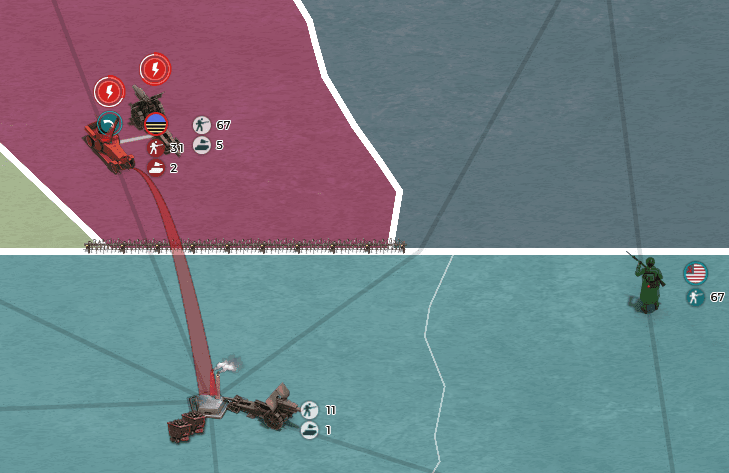


So I got this nasty graphics glitch.
I loaded the first time saw units.
Reloaded a second time and on all my games the units are gone.
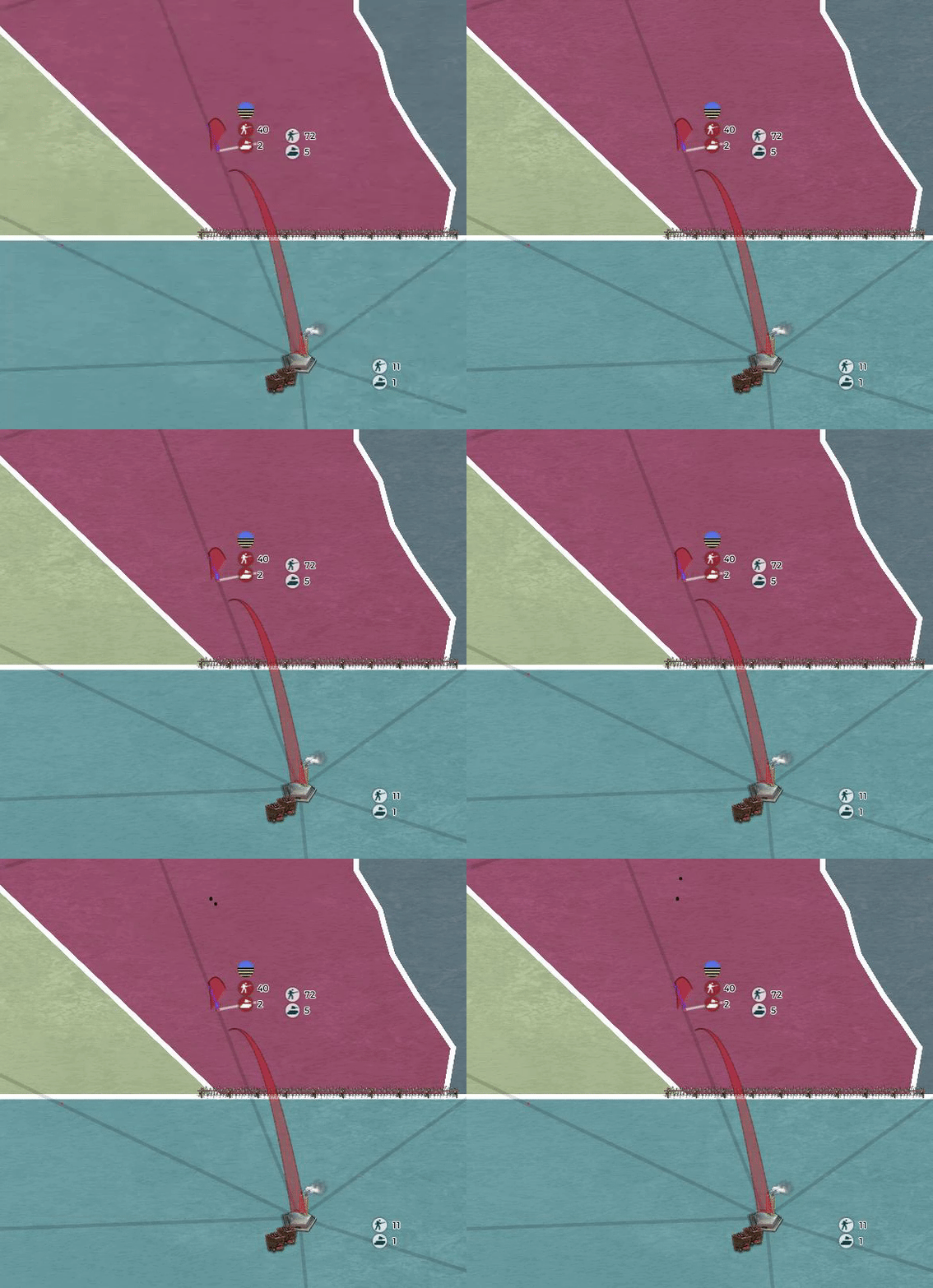
Google Chrome Fully Updated
Graphics Cards Fully Updated
Tried Cache Clear and Multiple Reloads
Windows 10 Fully Updated
Full System Specs Below:
------------------
System Information
------------------
Time of this report: 11/28/2018, 03:44:16
Machine name: DESKTOP-KCR7MUK
Machine Id: {168EE221-74BC-4E5C-B131-D6E82AF2E1DE}
Operating System: Windows 10 Home 64-bit (10.0, Build 17134) (17134.rs4_release.180410-1804)
Language: English (Regional Setting: English)
System Manufacturer: HP
System Model: HP Pavilion Desktop PC 570-p0xx
BIOS: F.24 (type: UEFI)
Processor: Intel(R) Core(TM) i5-7400 CPU @ 3.00GHz (4 CPUs), ~3.0GHz
Memory: 8192MB RAM
Available OS Memory: 8080MB RAM
Page File: 7818MB used, 9071MB available
Windows Dir: C:\WINDOWS
DirectX Version: DirectX 12
DX Setup Parameters: Not found
User DPI Setting: 96 DPI (100 percent)
System DPI Setting: 96 DPI (100 percent)
DWM DPI Scaling: Disabled
Miracast: Available, with HDCP
Microsoft Graphics Hybrid: Not Supported
DxDiag Version: 10.00.17134.0001 64bit Unicode
------------
DxDiag Notes
------------
Display Tab 1: No problems found.
Sound Tab 1: No problems found.
Input Tab: No problems found.
--------------------
DirectX Debug Levels
--------------------
Direct3D: 0/4 (retail)
DirectDraw: 0/4 (retail)
DirectInput: 0/5 (retail)
DirectMusic: 0/5 (retail)
DirectPlay: 0/9 (retail)
DirectSound: 0/5 (retail)
DirectShow: 0/6 (retail)
---------------
Display Devices
---------------
Card name: Intel(R) HD Graphics 630
Manufacturer: Intel Corporation
Chip type: Intel(R) HD Graphics Family
DAC type: Internal
Device Type: Full Device (POST)
Device Key: Enum\PCI\VEN_8086&DEV_5912&SUBSYS_82F2103C&REV_04
Device Status: 0180200A [DN_DRIVER_LOADED|DN_STARTED|DN_DISABLEABLE|DN_NT_ENUMERATOR|DN_NT_DRIVER]
Device Problem Code: No Problem
Driver Problem Code: Unknown
Display Memory: 5338 MB
Dedicated Memory: 1298 MB
Shared Memory: 4040 MB
Current Mode: 1600 x 900 (32 bit) (60Hz)
HDR Support: Not Supported
Display Topology: Internal
Display Color Space: DXGI_COLOR_SPACE_RGB_FULL_G22_NONE_P709
Color Primaries: Red(0.650891,0.335461), Green(0.295422,0.605969), Blue(0.145031,0.075695), White Point(0.313977,0.329602)
Display Luminance: Min Luminance = 0.500000, Max Luminance = 270.000000, MaxFullFrameLuminance = 270.000000
Monitor Name: HP 2011x LED Backlit LCD Monitor
Monitor Model: HP 2011
Monitor Id: HWP2935
Native Mode: 1600 x 900(p) (60.000Hz)
Output Type: Displayport External
Monitor Capabilities: HDR Not Supported
Display Pixel Format: DISPLAYCONFIG_PIXELFORMAT_32BPP
Advanced Color: Not Supported
Driver Name: C:\WINDOWS\System32\DriverStore\FileRepository\ki129407.inf_amd64_f26f36ac54ce3076\igdumdim64.dll,C:\WINDOWS\System32\DriverStore\FileRepository\ki129407.inf_amd64_f26f36ac54ce3076\igd10iumd64.dll,C:\WINDOWS\System32\DriverStore\FileRepository\ki129407.inf_amd64_f26f36ac54ce3076\igd10iumd64.dll,C:\WINDOWS\System32\DriverStore\FileRepository\ki129407.inf_amd64_f26f36ac54ce3076\igd12umd64.dll
Driver File Version: 24.20.0100.6344 (English)
Driver Version: 24.20.100.6344
DDI Version: 12
Feature Levels: 12_1,12_0,11_1,11_0,10_1,10_0,9_3,9_2,9_1
Driver Model: WDDM 2.4
Graphics Preemption: Triangle
Compute Preemption: Thread
Miracast: Supported
Hybrid Graphics GPU: Integrated
Power P-states: Not Supported
Virtualization: Paravirtualization
Block List: No Blocks
Catalog Attributes: Universal:False Declarative:False
Driver Attributes: Final Retail
Driver Date/Size: 9/13/2018 7:00:00 PM, 2381240 bytes
WHQL Logo'd: Yes
WHQL Date Stamp: Unknown
Device Identifier: {D7B78E66-1A52-11CF-446B-96A2BFC2D535}
Vendor ID: 0x8086
Device ID: 0x5912
SubSys ID: 0x82F2103C
Revision ID: 0x0004
Driver Strong Name: oem37.inf:5f63e5341bf86c41:iKBLD_w10_DS:24.20.100.6344:pci\ven_8086&dev_5912&subsys_82f2103c
Rank Of Driver: 00D10001
Video Accel: ModeMPEG2_A ModeMPEG2_C ModeWMV9_C ModeVC1_C
DXVA2 Modes: DXVA2_ModeMPEG2_VLD DXVA2_ModeMPEG2_IDCT DXVA2_ModeVC1_D2010 DXVA2_ModeWMV9_IDCT DXVA2_ModeVC1_IDCT DXVA2_ModeH264_VLD_NoFGT DXVA2_ModeH264_VLD_Stereo_Progressive_NoFGT DXVA2_ModeH264_VLD_Stereo_NoFGT DXVA2_ModeH264_VLD_Multiview_NoFGT DXVA2_ModeVP8_VLD DXVA2_ModeHEVC_VLD_Main DXVA2_ModeHEVC_VLD_Main10 DXVA2_ModeVP9_VLD_Profile0 DXVA2_ModeVP9_VLD_10bit_Profile2
Deinterlace Caps: {BF752EF6-8CC4-457A-BE1B-08BD1CAEEE9F}: Format(In/Out)=(YUY2,YUY2) Frames(Prev/Fwd/Back)=(0,0,1) Caps=VideoProcess_YUV2RGB VideoProcess_StretchX VideoProcess_StretchY VideoProcess_AlphaBlend DeinterlaceTech_EdgeFiltering
{335AA36E-7884-43A4-9C91-7F87FAF3E37E}: Format(In/Out)=(YUY2,YUY2) Frames(Prev/Fwd/Back)=(0,0,0) Caps=VideoProcess_YUV2RGB VideoProcess_StretchX VideoProcess_StretchY VideoProcess_AlphaBlend DeinterlaceTech_BOBVerticalStretch
{5A54A0C9-C7EC-4BD9-8EDE-F3C75DC4393B}: Format(In/Out)=(YUY2,YUY2) Frames(Prev/Fwd/Back)=(0,0,0) Caps=VideoProcess_YUV2RGB VideoProcess_StretchX VideoProcess_StretchY VideoProcess_AlphaBlend
{BF752EF6-8CC4-457A-BE1B-08BD1CAEEE9F}: Format(In/Out)=(UYVY,YUY2) Frames(Prev/Fwd/Back)=(0,0,1) Caps=VideoProcess_YUV2RGB VideoProcess_StretchX VideoProcess_StretchY VideoProcess_AlphaBlend DeinterlaceTech_EdgeFiltering
{335AA36E-7884-43A4-9C91-7F87FAF3E37E}: Format(In/Out)=(UYVY,YUY2) Frames(Prev/Fwd/Back)=(0,0,0) Caps=VideoProcess_YUV2RGB VideoProcess_StretchX VideoProcess_StretchY VideoProcess_AlphaBlend DeinterlaceTech_BOBVerticalStretch
{5A54A0C9-C7EC-4BD9-8EDE-F3C75DC4393B}: Format(In/Out)=(UYVY,YUY2) Frames(Prev/Fwd/Back)=(0,0,0) Caps=VideoProcess_YUV2RGB VideoProcess_StretchX VideoProcess_StretchY VideoProcess_AlphaBlend
{BF752EF6-8CC4-457A-BE1B-08BD1CAEEE9F}: Format(In/Out)=(YV12,YUY2) Frames(Prev/Fwd/Back)=(0,0,1) Caps=VideoProcess_YUV2RGB VideoProcess_StretchX VideoProcess_StretchY VideoProcess_AlphaBlend DeinterlaceTech_EdgeFiltering
{335AA36E-7884-43A4-9C91-7F87FAF3E37E}: Format(In/Out)=(YV12,YUY2) Frames(Prev/Fwd/Back)=(0,0,0) Caps=VideoProcess_YUV2RGB VideoProcess_StretchX VideoProcess_StretchY VideoProcess_AlphaBlend DeinterlaceTech_BOBVerticalStretch
{5A54A0C9-C7EC-4BD9-8EDE-F3C75DC4393B}: Format(In/Out)=(YV12,YUY2) Frames(Prev/Fwd/Back)=(0,0,0) Caps=VideoProcess_YUV2RGB VideoProcess_StretchX VideoProcess_StretchY VideoProcess_AlphaBlend
{BF752EF6-8CC4-457A-BE1B-08BD1CAEEE9F}: Format(In/Out)=(NV12,YUY2) Frames(Prev/Fwd/Back)=(0,0,1) Caps=VideoProcess_YUV2RGB VideoProcess_StretchX VideoProcess_StretchY VideoProcess_AlphaBlend DeinterlaceTech_EdgeFiltering
{335AA36E-7884-43A4-9C91-7F87FAF3E37E}: Format(In/Out)=(NV12,YUY2) Frames(Prev/Fwd/Back)=(0,0,0) Caps=VideoProcess_YUV2RGB VideoProcess_StretchX VideoProcess_StretchY VideoProcess_AlphaBlend DeinterlaceTech_BOBVerticalStretch
{5A54A0C9-C7EC-4BD9-8EDE-F3C75DC4393B}: Format(In/Out)=(NV12,YUY2) Frames(Prev/Fwd/Back)=(0,0,0) Caps=VideoProcess_YUV2RGB VideoProcess_StretchX VideoProcess_StretchY VideoProcess_AlphaBlend
{BF752EF6-8CC4-457A-BE1B-08BD1CAEEE9F}: Format(In/Out)=(IMC1,YUY2) Frames(Prev/Fwd/Back)=(0,0,1) Caps=VideoProcess_YUV2RGB VideoProcess_StretchX VideoProcess_StretchY VideoProcess_AlphaBlend DeinterlaceTech_EdgeFiltering
{335AA36E-7884-43A4-9C91-7F87FAF3E37E}: Format(In/Out)=(IMC1,YUY2) Frames(Prev/Fwd/Back)=(0,0,0) Caps=VideoProcess_YUV2RGB VideoProcess_StretchX VideoProcess_StretchY VideoProcess_AlphaBlend DeinterlaceTech_BOBVerticalStretch
{5A54A0C9-C7EC-4BD9-8EDE-F3C75DC4393B}: Format(In/Out)=(IMC1,YUY2) Frames(Prev/Fwd/Back)=(0,0,0) Caps=VideoProcess_YUV2RGB VideoProcess_StretchX VideoProcess_StretchY VideoProcess_AlphaBlend
{BF752EF6-8CC4-457A-BE1B-08BD1CAEEE9F}: Format(In/Out)=(IMC2,YUY2) Frames(Prev/Fwd/Back)=(0,0,1) Caps=VideoProcess_YUV2RGB VideoProcess_StretchX VideoProcess_StretchY VideoProcess_AlphaBlend DeinterlaceTech_EdgeFiltering
{335AA36E-7884-43A4-9C91-7F87FAF3E37E}: Format(In/Out)=(IMC2,YUY2) Frames(Prev/Fwd/Back)=(0,0,0) Caps=VideoProcess_YUV2RGB VideoProcess_StretchX VideoProcess_StretchY VideoProcess_AlphaBlend DeinterlaceTech_BOBVerticalStretch
{5A54A0C9-C7EC-4BD9-8EDE-F3C75DC4393B}: Format(In/Out)=(IMC2,YUY2) Frames(Prev/Fwd/Back)=(0,0,0) Caps=VideoProcess_YUV2RGB VideoProcess_StretchX VideoProcess_StretchY VideoProcess_AlphaBlend
{BF752EF6-8CC4-457A-BE1B-08BD1CAEEE9F}: Format(In/Out)=(IMC3,YUY2) Frames(Prev/Fwd/Back)=(0,0,1) Caps=VideoProcess_YUV2RGB VideoProcess_StretchX VideoProcess_StretchY VideoProcess_AlphaBlend DeinterlaceTech_EdgeFiltering
{335AA36E-7884-43A4-9C91-7F87FAF3E37E}: Format(In/Out)=(IMC3,YUY2) Frames(Prev/Fwd/Back)=(0,0,0) Caps=VideoProcess_YUV2RGB VideoProcess_StretchX VideoProcess_StretchY VideoProcess_AlphaBlend DeinterlaceTech_BOBVerticalStretch
{5A54A0C9-C7EC-4BD9-8EDE-F3C75DC4393B}: Format(In/Out)=(IMC3,YUY2) Frames(Prev/Fwd/Back)=(0,0,0) Caps=VideoProcess_YUV2RGB VideoProcess_StretchX VideoProcess_StretchY VideoProcess_AlphaBlend
{BF752EF6-8CC4-457A-BE1B-08BD1CAEEE9F}: Format(In/Out)=(IMC4,YUY2) Frames(Prev/Fwd/Back)=(0,0,1) Caps=VideoProcess_YUV2RGB VideoProcess_StretchX VideoProcess_StretchY VideoProcess_AlphaBlend DeinterlaceTech_EdgeFiltering
{335AA36E-7884-43A4-9C91-7F87FAF3E37E}: Format(In/Out)=(IMC4,YUY2) Frames(Prev/Fwd/Back)=(0,0,0) Caps=VideoProcess_YUV2RGB VideoProcess_StretchX VideoProcess_StretchY VideoProcess_AlphaBlend DeinterlaceTech_BOBVerticalStretch
{5A54A0C9-C7EC-4BD9-8EDE-F3C75DC4393B}: Format(In/Out)=(IMC4,YUY2) Frames(Prev/Fwd/Back)=(0,0,0) Caps=VideoProcess_YUV2RGB VideoProcess_StretchX VideoProcess_StretchY VideoProcess_AlphaBlend
D3D9 Overlay: Supported
DXVA-HD: Supported
DDraw Status: Enabled
D3D Status: Enabled
AGP Status: Enabled
MPO MaxPlanes: 1
MPO Caps: Not Supported
MPO Stretch: Not Supported
MPO Media Hints: Not Supported
MPO Formats: Not Supported
PanelFitter Caps: Not Supported
PanelFitter Stretch: Not Supported
Long time Supremacy 1914 player and Ex-Game Operator of Thirty Kingdoms
 May Thirty Kingdoms Rest In Peace
Update:
I reloaded again and now I see the image below.
Something is clearly not stable.
Nothing on my end has changed but for some reason the units load sometimes and other times nothing.
Long time Supremacy 1914 player and Ex-Game Operator of Thirty Kingdoms
May Thirty Kingdoms Rest In Peace
Thanks, we will look into it.
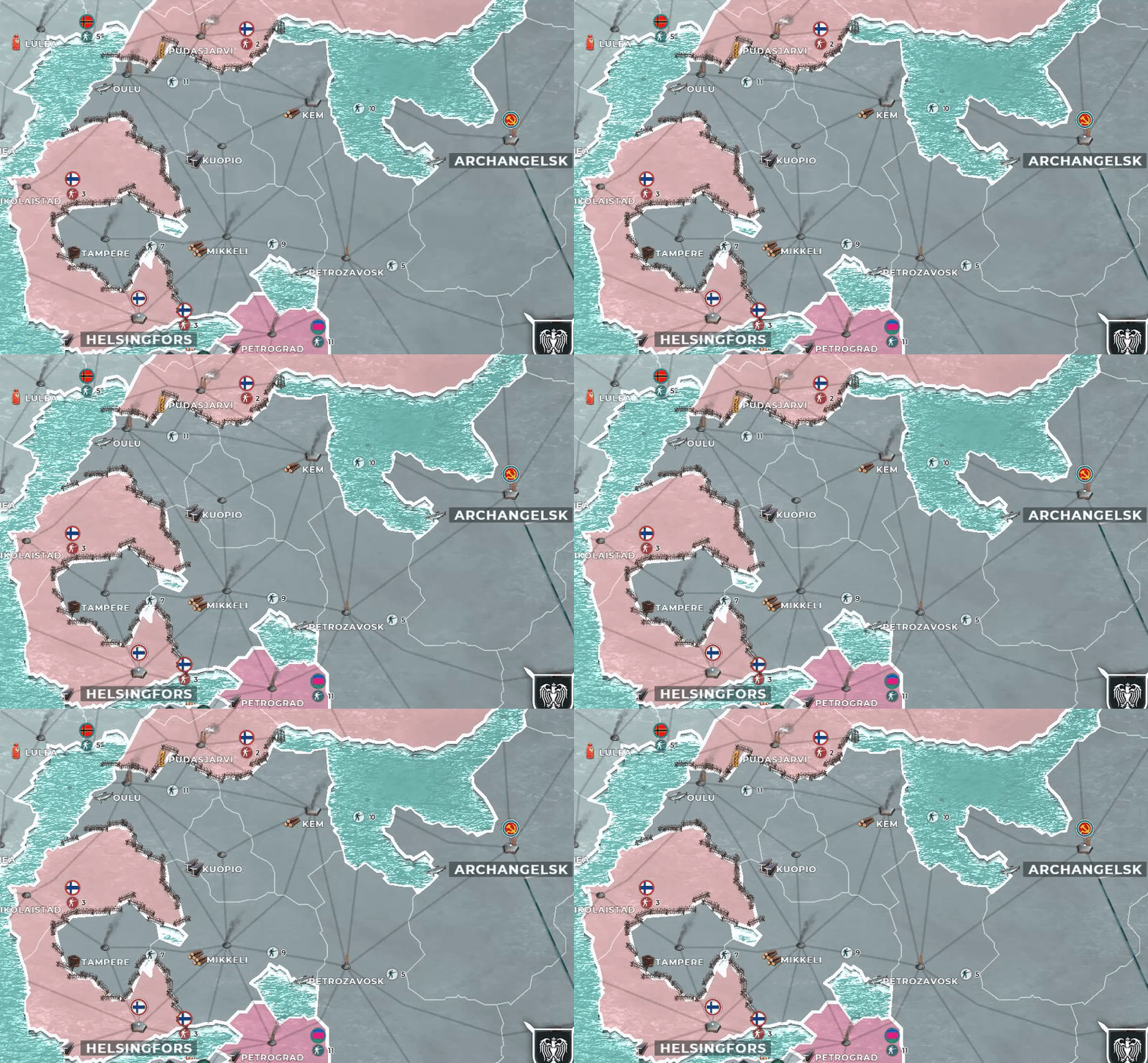
Woke up today like lets play some Supremacy.
Hoping my units was still showing.
What I found.
I guess its super unstable.
Long time Supremacy 1914 player and Ex-Game Operator of Thirty Kingdoms
May Thirty Kingdoms Rest In Peace
Further trouble shooting on my end.
I thought maybe it wasn't my system at all and maybe it was the browser.
Google Chrome being the 1# most used browser in the United States.
It is a Google Chrome based Issue.
I loaded all of my games on FireFox and all the graphics and icons have loaded correctly.
I closed the games and the entire browser and loaded the game again same result.
Long time Supremacy 1914 player and Ex-Game Operator of Thirty Kingdoms
May Thirty Kingdoms Rest In Peace
Please log in to post a reply.


