today is a good day for us and hopefully for you too, since the Call of War client for mobile phones is being released today to Frontline pioneers
We are still heavily developing right now and it will change a lot over the next days and weeks when we add missing features, fix bugs and polish the usability.
There are a couple of remarks which are good to know in advance:
1) We will eventually implement all features of the desktop client also in mobile, but there are a couple of bigger / important features which are not yet included:
Support for languages other than English
Newspaper (coming really soon)
Coalitions
Build Queue
Alliances
Creating new games (joining works already)
Ranking and player stats
PMs
Optimized Shop
Account settings
These will all arrive soon but are just not in the initial version yet.
2) We need your feedback!
We tried very hard to give you a good experience already in the initial version, but a few of the things we've implemented are still experimental and a few can still be polished and adjusted. So please explicitly tell us what you think about things like:
Performance
Touch interaction with armies
Touch interaction with provinces
Do you find the information you need?
Do things behave the way you expect (e.g. opening / closing of windows & popups, UI swiping, zooming, etc.)
Where to to report feedback?
When giving feedback, please include the information of what
device,
operating system version and
browser version
you are using. If in doubt, please use the "Report bug" button in the client, it will collect that information and attach it to your report.
You can also report feedback here in the beta forum. General feedback like on usability etc. you can add to this thread, if you report bugs, please either use the button in the game or create new posts here in the fronti forum, which you please clearly mark as "mobile client" bugs.
So how do I log in to the mobile client?
You need to be (or become) a frontline pioneer (see news on callofwar.com for submitting applications).
You need to login in your normal mobile browser on callofwar.com with your iOS or Android phone and the mobile client will load for you.
If you do get the old client you know from desktop on your phone, please report this to us including the information what device you tried. You can still switch to the mobile client, once you try to log in to a game from the desktop version and click the "Switch to mobile" button. Your device will remember the setting until you switch back.
To say it explicitly: You do not need to use your device's App store, you simply open callofwar.com in your mobile browser and log in like always.
Switching between mobile and desktop version on a device is possible through the button on the loading screen.
Thank you and have fun playing!
Post a Reply
Please log in to post a reply.
28 Replies
22 Jun 2017, 12:20
Changelog:
June 22-29:
released article overview for newspaper (filters are still non-functional)
released newspaper index of nations
several small polishing fixes
Work in progress
Writing newspaper articles
Confirmation and price info for morale increase/decrease buttons
Tutorial
Mobile optimized log-in page
Shop
More polishing fixes
22 Jun 2017, 15:40
Guess Im the first
Did a bit of fooling around and it works decently for a beta. You can find everything you need, performance is stable.
A few things to consider though:
1: The province view is awkward, you cant see the buildings you already have immediately, even though its a selectable option. Am I missing something? Though I understand the small screen leads to sacrifices, I was hoping for something like a city/province view like in Supremacy 1914 where you see an overview of what you have with 1 click.
2: on pc, you have the option to micromicromanage by use of the control button, I miss it on the mobile version or I havent found out how to do it.
3: I was hoping (see also point 2) that you could zoom 'indefinitely', so you can order your unit very very precisely as it is sometimes needed.
At first glance, the mobile version is for me, at this very moment, perfect for doing basic tasks like researching, stockmarket purchases and getting your buildings going while away from pc. It is not suited at all for the more complex battlefield actions.
device: Huawei G6, Android.
22 Jun 2017, 15:56
miech wrote:
2: on pc, you have the option to micromicromanage by use of the control button, I miss it on the mobile version or I havent found out how to do it.
If you tap and hold for a second, a blue circle fill up. Once it is filled, you can move your finger around the troops you want to select - not like the CTRL function, but rather like the 'lasso function' you may know from the desktop client.
22 Jun 2017, 18:15
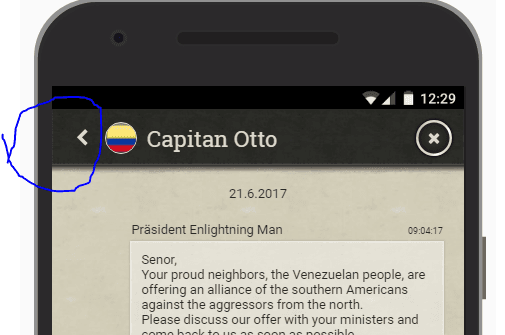
Just Something small I noticed. The diplomacy tab works fine, and I was able to access a message, but when I looked to go back into the main list of recent messages, I could not find a back button. I'm not sure if I'm missing something or if that's actually a problem.
Device: Apple, IOS 10.3.2
29 Jun 2017, 06:51
@General A 11
The "back" button is located on the top left. Please confim that it is visible to you.
Feedback like this is in fact very valuable for us, since there are still some tweaks to be done to smoothen navigation of didalogs.
See screenshot: [/img]
1 Jul 2017, 11:19
Using my Iphone with iOs 10.3.2 I am not able to see the coalition chat tab or any whispers. I can switch back and forth between Global and Help chat, but the "more" down arrow does not seem to be active. I presume the "more" down arrow is where I would find coalition chat and whispers.
In addition I was not able to submit a bug report. I could fill out the title of the bug report, but was unable to scroll around the screen to see or fill out the main body of the bug report.
War is a game that is played with a smile. If you can't smile, grin. If you can't grin keep out of the way til you can. - Winston Churchill VorlonFCW Retired from Bytro staff as of November 30, 2020. >>> Click Here to submit a bug report or support ticket <<<
4 Jul 2017, 13:46
@Enlightening Man
I do not actually see the button, but I think I know the problem. I have a iPhone 5, so the screen is smaller than the newer iPhones. If the mobile version is optimized for a bigger screen, the back button might have been cut off.
5 Jul 2017, 07:23
@General A 11 We actually use iPhone 5 dimensions as the smallest supported screen-size so we try to fit everything in. We will check the not visible back buttons on it again.
In the meantime: With yesterday's update, the click on the text ("Captain Otto" in my screenshot above) also executes the "back" action you would find on the back arrow.
20 Aug 2017, 10:33
It is a bit early for making suggestions bc I only used it for real a few times now. Here are just a few user experience comments.
I used the mobile on PC for testing. Works fine except for getting used to the different lay out.
Had a iPad for a while, which was great to play on (but lost it...)
Also use the mobile version on my Samsung S3 Neo (yes, its and old phone) and yesterday I was actually able to give several useful commands and take some provinces. Love the improvements compared to the earliest days.
The commands for the troops are quite clear and work pretty good, except that it is difficult to exactly hit a certain location. Often I find out afterwards that my troops ended up a few minutes outside the city I send them too. As long as they passed the city and took it, I do not have a real problem with that
Finding things like buildings in the province administration, doing the right research etc remains a bit awkward.
Overal it seems to qork quite well, though the screen gets a bit crowded when doing stuff and is only workable on my phone when held in portrait.
All in all the mobile version is a very good addition and allows me to continue monitoring and and execute a large number of things, while away from the PC.
20 Aug 2017, 16:35
I love mobile and I think its easier to play on than pc in my opinion but for some reason Im experiencing frequent crashes and for some reason it wont let me split up units maybe its my wifi or the fact my iphone hasnt been backed up for weeks other wise great addition
29 Aug 2017, 14:18
Thank you guys for the nice feedback. Glad you like it and it's useful.
We will keep all feedback regarding usability in mind with coming polishing iterations.
@Dramos: Which iphone version are you using? Do you experience crashes in other apps as well?
30 Aug 2017, 01:23
Im using a iphone 7 but I havent backed it up in weeks so may that be why?
3 Sept 2017, 10:00
Have been using the mobile version on my Android phone the last 2-3 weeks. Seems to be running well so far.
Someone once asked, 'What is the difference between me and Saddam Hussein?' The answer is, 'I have a conscience and he doesn't.'- Norman Schwarzkopf - Boomer Sooner :!: :!: -
2 Feb 2018, 14:52
Enlightning Man wrote:
Hello Generals,
today is a good day for us and hopefully for you too, since the Call of War client for mobile phones is being released today to Frontline pioneers
We are still heavily developing right now and it will change a lot over the next days and weeks when we add missing features, fix bugs and polish the usability.
There are a couple of remarks which are good to know in advance:
1) We will eventually implement all features of the desktop client also in mobile, but there are a couple of bigger / important features which are not yet included:
Support for languages other than English
Newspaper (coming really soon)
Coalitions
Build Queue
Alliances
Creating new games (joining works already)
Ranking and player stats
PMs
Optimized Shop
Account settings
These will all arrive soon but are just not in the initial version yet.
2) We need your feedback!
We tried very hard to give you a good experience already in the initial version, but a few of the things we've implemented are still experimental and a few can still be polished and adjusted. So please explicitly tell us what you think about things like:
Performance
Touch interaction with armies
Touch interaction with provinces
Do you find the information you need?
Do things behave the way you expect (e.g. opening / closing of windows & popups, UI swiping, zooming, etc.)
Where to to report feedback?
When giving feedback, please include the information of what
device,
operating system version and
browser version
you are using. If in doubt, please use the "Report bug" button in the client, it will collect that information and attach it to your report.
You can also report feedback here in the beta forum. General feedback like on usability etc. you can add to this thread, if you report bugs, please either use the button in the game or create new posts here in the fronti forum, which you please clearly mark as "mobile client" bugs.
So how do I log in to the mobile client?
You need to be (or become) a frontline pioneer (see news on callofwar.com for submitting applications).
You need to login in your normal mobile browser on callofwar.com with your iOS or Android phone and the mobile client will load for you.
If you do get the old client you know from desktop on your phone, please report this to us including the information what device you tried. You can still switch to the mobile client, once you try to log in to a game from the desktop version and click the "Switch to mobile" button. Your device will remember the setting until you switch back.
To say it explicitly: You do not need to use your device's App store, you simply open callofwar.com in your mobile browser and log in like always.
Switching between mobile and desktop version on a device is possible through the button on the loading screen.
Thank you and have fun playing!
hey
I have a problem, I didn't find the switch to mobile button
I switched to desktop to try it
And now I'm stuck and I can't do anything and I can't see
Soo my problem is where is the switch button exactly
Ps if there a screen shot it will be great ☺
Note 3
2 Feb 2018, 15:50
We do have an app available in the Play Store, now. Give that a shot
Pax Romana Communications Officer
2 Feb 2018, 16:47
The button is available while loading any map
War is a game that is played with a smile. If you can't smile, grin. If you can't grin keep out of the way til you can. - Winston Churchill VorlonFCW Retired from Bytro staff as of November 30, 2020. >>> Click Here to submit a bug report or support ticket <<<
2 Feb 2018, 16:50
VorlonFCW wrote:
The button is available while loading any map
On PC it is. On mobile, it is not.
Pax Romana Communications Officer
2 Feb 2018, 17:04
StrangeTalent wrote:
On PC it is. On mobile, it is not.
I have it on my iPhone when in desktop mode. . .
War is a game that is played with a smile. If you can't smile, grin. If you can't grin keep out of the way til you can. - Winston Churchill VorlonFCW Retired from Bytro staff as of November 30, 2020. >>> Click Here to submit a bug report or support ticket <<<
2 Feb 2018, 18:07
iOS uses browser, not app, though.
Pax Romana Communications Officer
2 Feb 2018, 21:04 (edited)
VorlonFCW wrote:
StrangeTalent wrote:
On PC it is. On mobile, it is not.
I have it on my iPhone when in desktop mode. . .
thaaaaaaaank yooooou
The only guy who explained it to me and it work, you need to put your phone in desktop mode before the lod screen


 [/img]


