I like this update 
17 Oct 2018, 11:07


Dear generals,
today we not only have a new update with some bug fixes and an exciting new feature, but also some shop related information to share. In the upcoming weeks some you will notice that the payment providers we offered will change. After looking into new and better options to provide a fast and secure way to process shop transactions we joined forces with Goodgame Studios. The shop will still look the same, but you will see some new payment methods while old ones have been removed. We are confident that there is still a wide range of different payment providers, which every player is able to choose from. Please keep in mind that if you selected fast check-out options (for example for Paypal) you may have to enter your details again. If you encounter any problems feel free to send a support ticket. This change will take some time until it is going to be available for every single player.
With our last update we implemented auto generated usernames for mobile users to make it easier for new players to take a look at our game. At the same time we do not want to force a name upon our players, which they do not like, therefore every user in our Call of War community will be able to change their name for free. Keep in mind, this option is only available once. The option to change the username can be found in the account settings. It also may take up to one hour until the name is updated in all games, rankings etc.
Further improvements and bug fixes:
Your Call of War team.
Please log in to post a reply.
I like this update
Thanks for the update, it looks so good on my phone as that’s 95% of what I play on. But is there anyway to fix the notch for my iPhone X Max? It just cuts the resources off.
Please and thank you... newbie loving what you have done!!
Thank you for your feedback. You should of course be able to see your resources so I forwarded the issue. Happy you enjoy the game!thUnderdog78 wrote:
Thanks for the update, it looks so good on my phone as that’s 95% of what I play on. But is there anyway to fix the notch for my iPhone X Max? It just cuts the resources off.Please and thank you... newbie loving what you have done!!

Could you by any chance make a screenshot where we can see how exactly the bar is cut off for you?
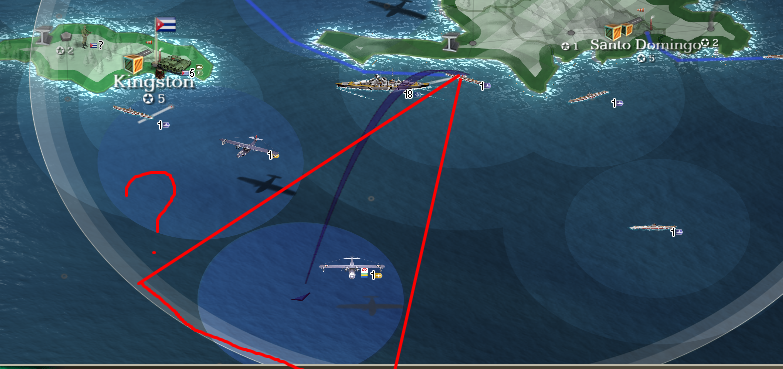
I have an issue with the aircraft on carriers. Sometimes I still cannot select the aircraft and need to switch to older version. And that triangle thing is missing now. ss:
Nothing but white screen and crashes ever since the update.
On the new platform in old games I suffer ghost units and misplaced units. Progression is not shown in other words you cannot see the troops marching and aircraft look static. Graphics are good. Overall the look and feel is better apart from the issues.
What are you using to load the game? Are you using iPad by any chance? If so what version are you using?alwaystryan wrote:
Nothing but white screen and crashes ever since the update.
I must be the outlier. The game works fine on my PC browser, but the app for my iPad is a disaster. The app restarts whenever I select an item (diplomacy, market, etc), the app crashes and restarts whenever I select an action and sometimes it just restarts when I do nothing. Sometimes when it restarts, it doesn’t come back, it just stays a blank white screen). I tried switching to Safari which was tolerable (I just would get a message that there is an error on the page) but now the site won’t load at all. I just get a blank white screen. I have tried closing the app and even deleting it and adding it back in from the App Store with no change. Ever since this patch the game on my iPad is just about worthless.
I get that blank white screen constantly on my iPhone. Perhaps it's an issue with the mobile app they haven't figured out yet. That never happens when I play on my PC.
Same happens to me on a regular basis
We're currently working on reproducing and fixing this problem with some iOS devices. Actually we would really appreciate your help here, as always. It would be beneficial if you could tell us the gameID and the device it happened on. This will help us fixing the this problem even faster. 
For me, game id’s
2497455, 2502151, 2503680
Device: apple ipad: mp2f2lla
The issue in browser is” an error occurred on the page” and it seems to impacts zooming in and out because after this message, trying to zoom in the window snaps back to its original size.
Are you running iOS 11.x.x or 12.0.1?OleRebel wrote:
Device: apple ipad: mp2f2lla
For me, this happens in game 2483997, a Frontline Pioneer game. It rarely happens in my regular game 2509189. Thus, I suspect it's a problem with the FP game specifically. I'm using an iPhone 7 Plus with IOS 11.4.1.
P.S. I happens when I try to take some action: move a unit, start building something in a city, click on the provinces tab, etc. It seems to be event triggered as it doesn't just happen if I'm staring at the screen.
Great, the name change was really needed.
I am running 12.01 on my iPad. And here is an error I get when using the browser version since I can no longer use the app...
Please log in to post a reply.


