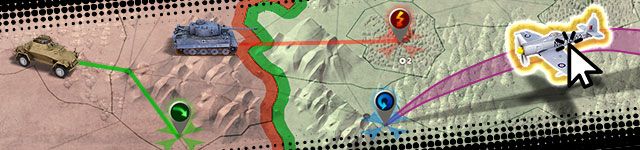
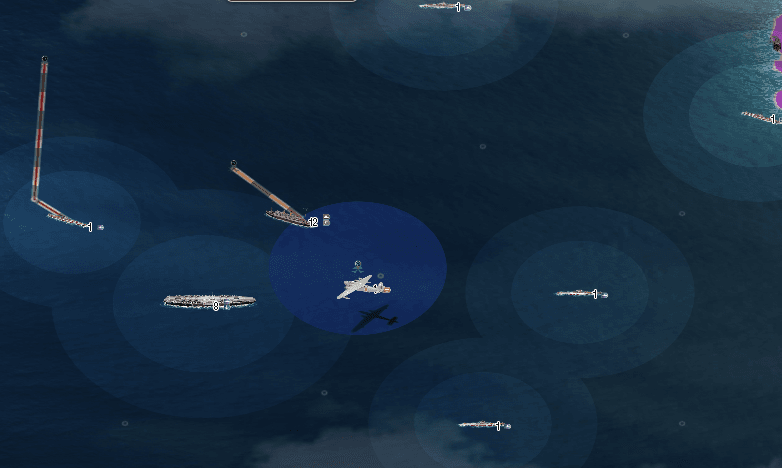
while our beta testers are still busy testing the new Paratroopers, we are bringing to you more bugfixes and graphical improvements which will give you a greater overview and precision in your commands. The first highlight is the reintroduction of the unit start animation in the enhanced graphics version, which gives direct feedback when units start following your orders. Next we implemented new path ending icons that give you a greater overview of where your armies are heading and which type of order they have. We also made the selection of units much more precisely aligned to their image on the map. Last but not least we added ground shadows for the flight arrows of airplanes, to give players better visual feedback of the actual flight path.
Please read the change log below for an overview of all new features and bugfixes.
Graphical improvements (WebGL version
A smooth starting animation is shown when giving a move command to a unit.
Unit selection is now pixel-perfectly aligned to the unit image instead of being an invisible box.
Airplane flight arrows now have a shadow underneath to accurately depict their actual flight path.
End points of paths on the map now show a new icon depicting the current order of the unit.
Path previews now display an attack icon when crossing enemy provinces.
The province colors in the morale view are now lighter again.
General improvements:
In the desktop version all menus now have a matching header image.
Bugfixes:
We fixed an issue that led to players achieving a solo map win despite being members of a coalition or team. Coalition or team victory conditions now have priority over the solo victory condition.
Achievement rewards now can be collected in a timely manner after unlocking them, without a long waiting time in between.
Airplanes on aircraft carriers can now always be selected properly.
We fixed a bug that led to attack vectors being displayed on certain maps after the game had ended.
WebGL: When moving a unit into an enemy province, the red attack path color is now always shown correctly
WebGL: Clouds no longer block the view in the middle of the screen.
We hope you like the changes and look forward to the upcoming release of the Paratroopers. You don’t have to wait much longer!
Your Bytro Team
Post a Reply
Please log in to post a reply.
18 Replies
16 Apr 2019, 14:37
the path that shows where the plane is headed on the ground gets covered up by the bar that shows how long until the plane attacks/patrols.
FORUM GANG WARRANT OFFICER "Those who cannot remember the past are condemned to repeat it." - George Santayana KNOW THE RULES! Call of War Game Rules Call of War Forum Rules Terms of Service attacker 101 Call of War Player EN Server | Bytro Labs Gmbh
16 Apr 2019, 14:57 (edited)
I can't select any of these units with left click. I have to use right click now. This is west coast of South America.
16 Apr 2019, 15:05
HMS Surprise wrote:
I can't select any of these units with left click. I have to use right click now. This is west coast of South America.
Hey HMS Suprise,
can you send me your game username and the game ID where you experience this issue?
16 Apr 2019, 16:17
great set of bug fixes. minor issues but they make the experience much better. danke! Tchuss
oh, one thing to consider. maybe we shouldn't see the trajectories of incoming rockets or from where planes are operating from? makes sense in the real world.
16 Apr 2019, 22:42
Great this makes it better! But the clouds still block out everything, and world maps are still really laggy and have troops which start dissapearing.
17 Apr 2019, 09:28
ITSAEROMF wrote:
[...] But the clouds still block out everything [...]
Can you send me a screenshot of that ITSAEROMF? The latest update should have reduced it. If that is not the case we need to get back to it.
17 Apr 2019, 16:18
Selection problems of armies should be resolved now.
Regarding unit images not being displayed when alooot of units are visible at the same time, this is on our plan to be fixed soon.
17 Apr 2019, 17:23
Yeah, 2 bugs so far, not being able to click on units past the seam on pacific ocean and sometimes, my units go invisible and I have to reload the page to see them.
17 Apr 2019, 18:04
Iczz wrote:
not being able to click on units past the seam on pacific ocean
That should be fixed now, except for the few units stuck inside the map seam itself, which require the alternate selection methods.
There are many alternate methods of selecting units when directly clicking on them is ineffective:
You may hold down the right mouse button and circle the area to select the units. Sometimes a "triangle" motion works better than a circle motion. This will make a gray shadow and select all the units in the loop. In the case of planes: Having the circle include the airbase or carrier they are stationed from is necessary. You will then need to use the split command to separate the planes from the carrier or units at the airfield.
Or, For units with a known designation, such as AB12, you can use Ctrl +F and type in the unitID to select the unit. You may be able to determine the designation from newspaper reports or from the unit list as if you were going to trade an army to someone in diplomacy menu. All of your units will start with the same letter code.
Or, The units can be selected by cycling through the units with the left and right arrow keys until the desired unit is found. Typically if you start by selecting a nearby unit and use an arrow key you will get other units within view. In some cases reloading the game will freshen the list and sort order, and enable you to find the unit easier with this method.
War is a game that is played with a smile. If you can't smile, grin. If you can't grin keep out of the way til you can. - Winston Churchill VorlonFCW Retired from Bytro staff as of November 30, 2020. >>> Click Here to submit a bug report or support ticket <<<
17 Apr 2019, 18:26
Ok, I just tried my map and it is fixed now! Thank you for helping me out.
19 Apr 2019, 00:16
I can't see the rocket's attack trajectory anymore, is that intentional?
"That's impossible! The Americans only know how to make razor blades." "We could do with some of those razor blades, Herr Reichsmarshall." Hermann Goring and Erwin Rommel
20 Apr 2019, 15:53
WebGL all still don't work at old videocards (as NV GT6600 and oldest)!
24 Apr 2019, 09:09
war-play wrote:
WebGL all still don't work at old videocards (as NV GT6600 and oldest)!
Does WebGL switch itself off automatically in that case or does the game directly start in Canvas? That would be intended. If that is not the case we will have to fix that. Would be great to hear back from you.
24 Apr 2019, 19:26
Yes, I can play in old mod (Canvas).
26 Apr 2019, 12:30
Hi guys ever since this new update alot of things are going wrong on the mobile app. Simple stuff unit selection, or issuing move/attack orders as well as split is not working.
It doesnt seem to be related to webgl as it makes no difference if its on or off I still cannot issue orders to certain units
26 Apr 2019, 18:04
Just tried it on the PC in 3 different browsers same issue as described above so its definitely not a mobile version issue its generalized on all platforms.
27 Apr 2019, 00:05
If you send in a bug report from the lower right corner of your game I can look into this issue.
War is a game that is played with a smile. If you can't smile, grin. If you can't grin keep out of the way til you can. - Winston Churchill VorlonFCW Retired from Bytro staff as of November 30, 2020. >>> Click Here to submit a bug report or support ticket <<<