In our internal balancing sheet formatting is used to help differentiate certain values. but you can ignore any cell formatting in the file that I posted, it is just a leftover from copying the values over. The important part are the actual values and they are not affected by the formatting. The values in the last file I posted should be correct.
“ Quote 👍 2 👎 0
I understand.
I'm sorry for saying useless things.
“ Quote 👍 1 👎 0
IK. Collaborative unofficial google sheets
“ Quote 👍 1 👎 0
OLIVERROBOT1808 wrote:
IK. Collaborative unofficial google sheetshttps://docs.google.com/spreadsheets/d/1x2U_c5uehd2-K46biaDv5mjbJf8ITnuEysyvPcUZniE/edit?usp=sharing
This will never catch on, but It's not boring and it makes me feel useful
“ Quote 👍 1 👎 0
Can someone tell me the armour classes for the following :
Nuclear Rocket ???
Railroadgun ???
Rocket ???
Flying Bomb???
Rocket Artillery = unarmoured?
Rocket Fighter =Air?
Thanks!
“ Quote 👍 1 👎 0
Nuclear Rocket : Air ( at airstrip or Aircraft Factory ) / Light armor ( at other place )
Railroadgun : heavy armor
Rocket : Air ( at airstrip or Aircraft Factory ) / Light armor ( at other place )
Flying Bomb : Air ( at airstrip or Aircraft Factory ) / Light armor ( at other place )
“ Quote 👍 2 👎 0
I have modified the freezy spreadsheet :
Added fields :
- doctrine
- name
- lev : research level
- typ : production type
- cls : armour class
- id : unique identifier for a unit type (same for all doctrines)
- hp : consolidated the 3 hit point types
Removed the doctrine/name/lev field
Changed the names of some fields to conform to my database configuration (sorry for any inconvenience)
Files :
ods : (open office) format I think it can be imported into excel
csv : This format will be easier to use to dump to a database
The above links do not work by clicking (probably due to not https)
so right click > copy link address > then paste in new tab
One thing missing from the freezy table is view and fire ranges.
“ Quote 👍 1 👎 0
does anyone know the urls to the unit images
Like these :
“ Quote 👍 1 👎 0
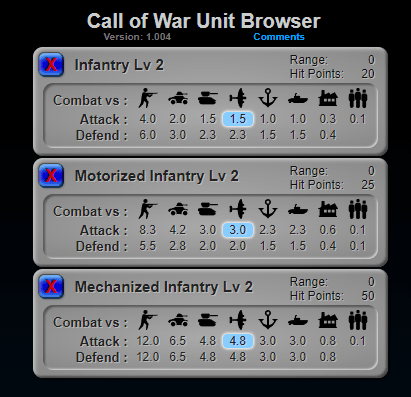
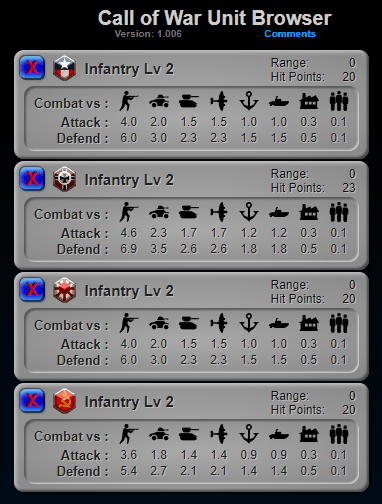
The unit browser now has all units in all 4 doctrines.
Images are missing for some unit types.
If anyone want the data in JSON format, dev tools > Sources > other_games/cow/CoW_ub.php > look in javascript tag id="JSON in here".
A neat feature now, is you can compare the same unit across all doctrines :
View the Unit Browser
“ Quote 👍 4 👎 0
https://wikiwiki.jp/callofwar/ユニット/ポートレート
suntso wrote:
does anyone know the urls to the unit images
Like these :
“ Quote 👍 0 👎 0
@pod_than
Those image url's are in Japanese and I have no way to decipher them.
Do you have the base url for those at cow?
“ Quote 👍 1 👎 0
You can check the URL by doing this.
However, if you edit it, other users may be in trouble.
So please "read only" ( of course, copy is OK. ).
“ Quote 👍 1 👎 0
Also, you might find this page helpful...
https://wikiwiki.jp/callofwar/物置き
In addition, if you want to browse the source of a specific part on another page, please click the icon shown below.
“ Quote 👍 1 👎 0
@pod_than
Thanks for all that, Unit Browser now has all images :
View Latest Version
“ Quote 👍 1 👎 0
suntso wrote:
does anyone know the urls to the unit images
Like these :
you can find the images in the official call of war wiki
“ Quote 👍 1 👎 0
In the official call of war wiki, no one can get all the images used in the game system.
For example, in Unit Category: Tank and Unit Category: Ordnance, only one of early icon and late icon is placed.
Moreover, there is no portrait image at all.
To get both images you need to reference the js file ( Java Script File ).
I think that's why the thread owner asked.
By the way...I would like to ask anyone.
Could you tell me the address of the terrain icon image?
It seems that it is probably defined in svg format.
But I couldn't determine the address because the node is assigned by a non-human readable algorithm.
“ Quote 👍 1 👎 0
@pod_than
Quote "It seems that it is probably defined in svg format."
Yes, they are in SVG format.
I had to create images that were similar.
You can access them @ http://www.starlords3k.com/other_games/cow/images/
They are the ones than begin "t_"
I had same issue with production type icons.
You can find them in same directory, with format "p#.png"
Also the armour classes, begin with "d_"
“ Quote 👍 1 👎 0
PNG format is a Raster format image.
That's nonsense so I can't use it.
Sorry.
“ Quote 👍 0 👎 0
@pod_than
I don't understand,
There are other .png files on your wiki.
“ Quote 👍 1 👎 0


 [/img]


 [/img]


