Call of War


A strong army needs the right leadership. Generals bring a new way to shape your forces in Call of War, with doctrine-specific commanders who attach to your armies and improve their capabilities through buffs.
This guide explains how Generals work. It covers doctrines and buffs, deployment, what your enemies can see, and how to unlock and level up your roster. Whether you are already testing in the beta or waiting for the full launch, consider this your one-stop, complete briefing on everything Generals.
What Is a General in Call of War?
A General is a historical or fictional commander who leads one of your armies. Each General has its own name, artwork and two buffs. Those buffs apply to the units in the army the General leads.
Sounds like a whole lot of dry theory? Let’s meet one of our Generals.
Pan-Asian Epic General Hiro Okada
Major General Hiroshi “Hiro” Okada is a strict, measured leader. Under his leadership troops strike decisively as soon as he orders them forward.
- Banzai Charge: Infantry units deal increased damage
- Reglementary Binoculars Infantry units gain increased vision range
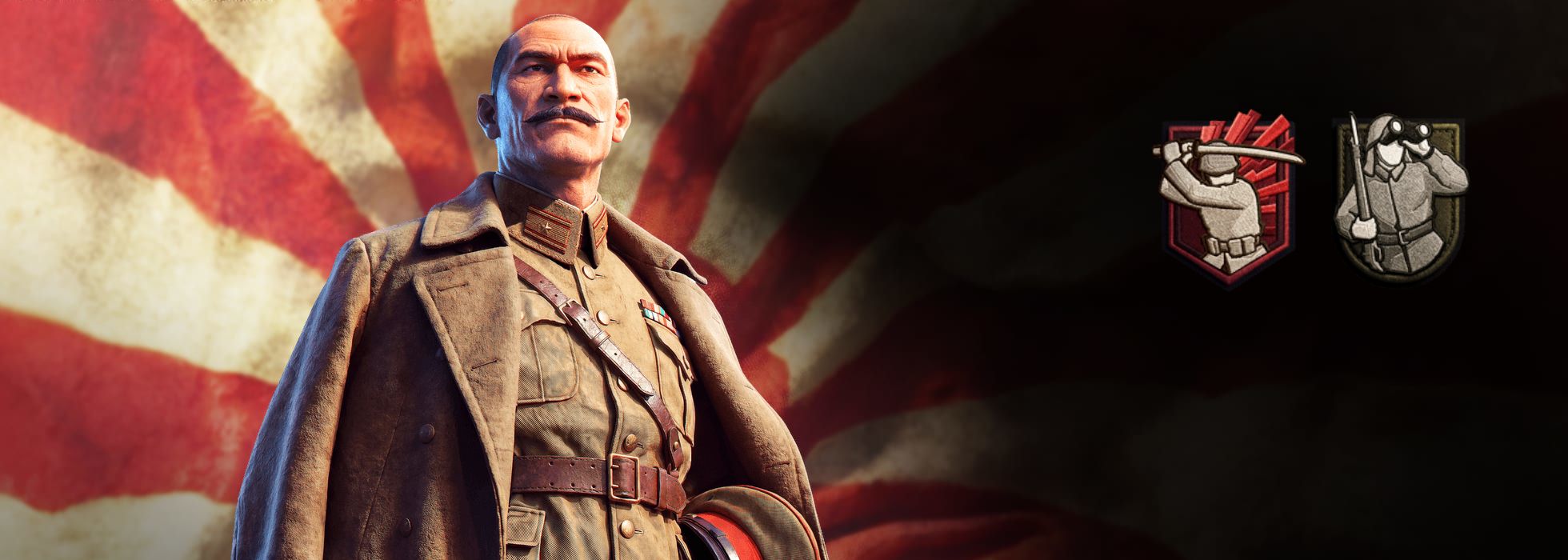
Importantly, Generals lead from the front, but they do not fight. Generals have no hit points of their own. Their job is to administer: they make the units they command better at what those units already do. Therefore, picking the right General for your army matters greatly.
Brains, Not Brawn
Important to note: Generals are not independent units. A General always attaches to an existing army. They cannot move around the map as a separate unit, and their buffs only reach the unit they are attached to.
A General’s buffs apply only to the army it is attached to, even if another army stands on the same spot. This also means that if two armies with Generals occupy the same spot, they do not merge.
Every General Belongs to a Doctrine
Every General is tied to one of the four doctrines, and you must be playing that doctrine to deploy them. Check your roster for matching Generals when planning your strategy for a game.
Right now, every doctrine has three: two Epic Generals and one Legendary General. More Generals will be added in the future.
All Generals have two buffs, unlocked through leveling up. Some bonuses also come with a debuff, a negative modifier used to balance the benefit. Read the full description when deciding where to deploy a General: a bonus may come with a trade-off that affects your plans.
Each General’s buffs are also related to their doctrine - underlining their strengths and weaknesses. Let’s look at an example below.
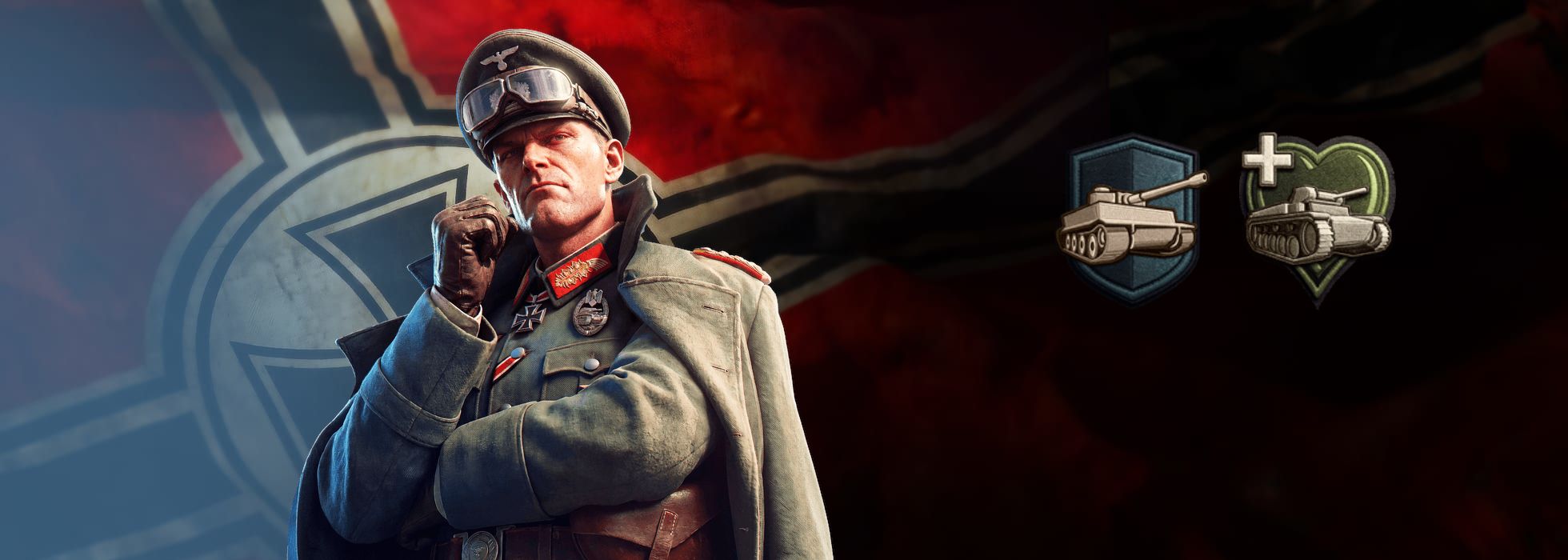
Axis Epic General Karl Reiter
General der Panzertruppe Karl Reiter is a cautious fellow that has figured out one important detail. Yes, the Tiger is the pinnacle of armored warfare - but it’s also costly to produce and in short supply. Reiter makes sure that your tanks survive to lessen the strain on the Vaterland’s overall war economy.
His two buffs are:
- Armor Plates: Tank units gain defense but lose movement speed
- Professional Maintenance: Tank units gain increased hitpoints
Those Porsche engines don’t maintain themselves, so you better make sure you have the top man for the job available!
How General Buffs Work
To generalize - each General has two buffs, and each buff names the units it affects. These rules apply to all buffs:
- A buff covers the whole unit type. It applies to all units from the named research tree, unless the buff says otherwise. A tank buff, for example, also applies to armored cars. Browse the research trees to check which units a buff covers.
- Attack and defense both count. Unless a buff says otherwise, it affects both attack and defense combat values.
- The game warns you about a mismatch. If you attach a General to an army it cannot boost, such as an infantry General on an air unit, you get a warning.
- Some buffs come with a debuff. For balance, a strong buff can carry a drawback. To take the previous example - all those extra armor plates slow down your tank!
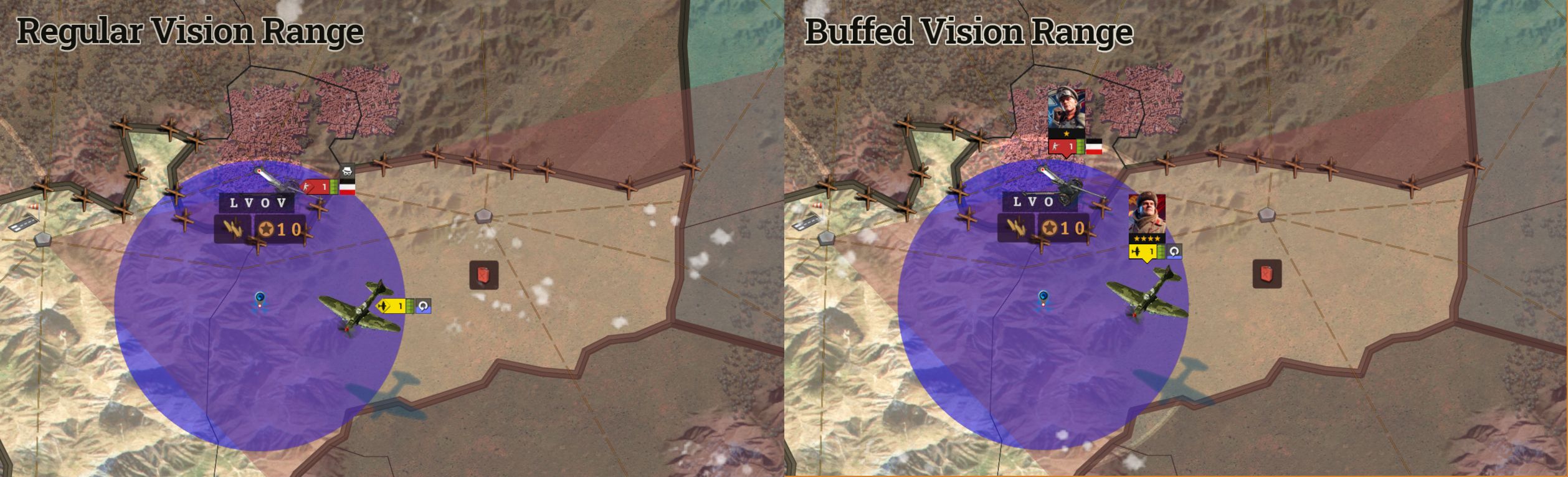
- Vision and patrol are separate. A buff that increases vision range does not increase patrol radius. Keep this in mind before you attach your Regimental Binoculars to a Fighter Squadron - your pilots have limited use for them.
How to Deploy a General
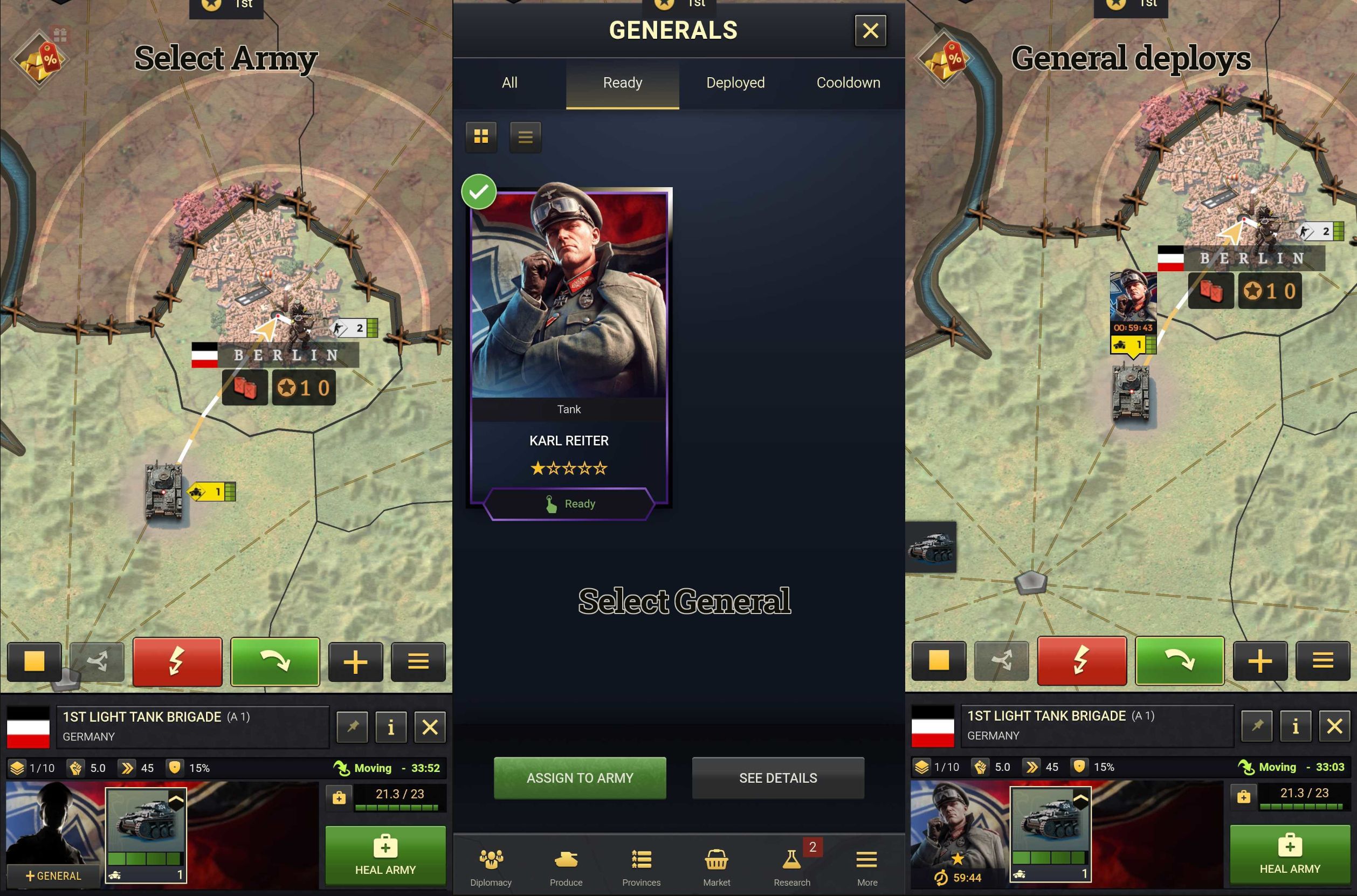
A General always attaches to an existing army. You cannot place a General on the map by itself.
1. Select the army you want the General to lead.
2. In the Army Bar, click the “Add General” button.
3. Pick your General and confirm.
Deployment takes 60 minutes. The army can continue moving during that time, but the General’s buffs only become active once deployment is complete. Allow for that delay when preparing an attack or reinforcing a threatened position.
An army already close to a melee engagement may not have time to complete the needed paperwork before the fighting starts. Therefore, if the army enters close combat during deployment, the General is sent straight back to HQ. This interruption does not trigger a recall or injury timer.
Rules for Deployed Generals
- No deploy limit. There is no limit on how many times you can deploy a General in a game.
- Every game is separate. All timers and deployments are per game. You can have the same General deployed on two maps at the same time.
- Your roster is permanent. Unlocked Generals and their levels are permanently available in your account.
- Armies with Generals do not merge. Two armies that each have a General can stand on the same spot without merging.
- Splitting keeps the General in place. When you split an army, the General stays with the army that is left behind.
- Level-ups need a re-deploy. A General that is already attached does not level up automatically. Recall it and deploy it again to apply the new level.
Recall and Injury Timers Explained
Two further timers control when a General is available to lead your troops: the recall timer and the injury timer. They make every assignment a real decision, because a General committed to one front may take time to become available elsewhere.
Recall Timer
You can recall a General from its army at any time, except during deployment or melee combat. To recall, select the General’s portrait in the Army Bar and use the recall button in the Generals window. Once recalled, the General goes on a 24 hour recall timer. When the timer finishes, you can deploy the General again.
Injury Timer
If the army a General leads is destroyed, the General goes on a 72 hour injury timer. They need the time to recuperate back at HQ - mostly to soothe their bruised ego.
The injury timer is significantly longer than the recall timer. If a position is about to fall, recall your General before close combat starts. Once the army is locked in melee, that option vanishes.
Timers Get Shorter at 5 Stars
Levelling up your Generals pays off on the clock as well. At 5 Stars, a General’s recall and injury timers are reduced.
Finally - all timers scale with the speed factor of the map. This table summarizes all Generals related timers you should keep track of:
| Timer | Duration | How it works |
|---|---|---|
| Deployment | 60 minutes | The time needed to attach to an army before buffs become active |
| Recall | 24 hours | The wait before redeployment after a General is recalled to HQ |
| Injury | 72 hours | The recovery period after the General’s army is destroyed in battle |
What Enemies Can(‘t) See: Generals and Fog of War
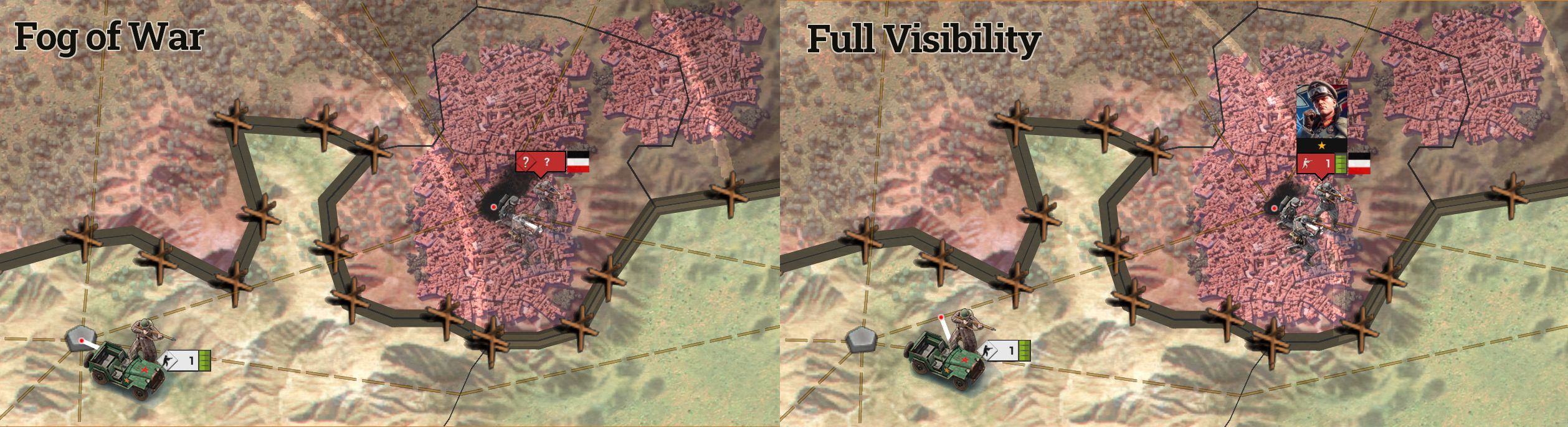
Generals follow the same vision rules as regular units. What your opponents learn depends on how much of your army they can see.
- In fog of war: Opponents can see that an army has a General, because it shows in the army label. They cannot see which General it is.
- With full visibility: Opponents can open the army info panel and see the General’s name, star level and active buffs.
- With stealth units: Attaching a General does not reveal a stealth unit to your enemies.
The same rules work in your favour. Once you gain vision on an enemy army, open its army info panel to see which General leads it and what that General does.
How to Unlock and Level Up Generals
Generals come from War Crates. Your first copy of a General unlocks it at 1 Star. Every further copy of the same General counts towards its next star level.
What Each Star Level Unlocks
Levelling up unlocks the second buff and strengthens the General’s bonuses:
| Star level | What you unlock |
|---|---|
| 1 star | The General and their first buff |
| 2 stars | The second buff |
| 3 stars | Buff improvements |
| 4 stars | Further buff improvements |
| 5 stars | Further buff improvements, plus shorter recall and injury timers |
The specific buff improvements can be found in the Generals panel. Check each General’s details to see what their next upgrade offers and how it fits the armies you want them to command.
The General info window shows how many copies you need for each level. Once a General reaches 5 Stars, any further copy of it turns into a high value replacement reward. It does not turn into a copy of a different General.
Generals Are in Beta
The Generals beta started on 4 November 2026 on desktop and mobile. The full launch for all players follows soon.
To join, fill out the beta sign-up form with your userID. Beta places are limited, and access rolls out in batches. Sign-ups are still open until the end of this week.
Most importantly - your feedback shapes what comes next. Specific examples help most: tell us your doctrine, your General, its level and what happened in the battle.
- Feedback and balance discussion: Share your thoughts in the Generals beta feedback thread or on the official Supremacy Discord. We are monitoring how Generals perform in games, and every report helps the team judge where buffs need a second look.
- Bugs: Contact customer support from the main menu. Describe what you were trying to do, what you expected to happen and what actually happened.
Your Generals Are Ready for Orders
Generals give every army a commander with two buffs, tied to your doctrine and shaped by your choices. Deploy them with care, recall them before a position falls, and level them up through War Crates to strengthen their buffs. Claim your free Draft Crate, pick your first General and see which front they turn in your favour.
Want the basics in an easily referenced short form? Check out the Generals FAQ on the forums.
See you on the battlefield!
Your Call of War Team